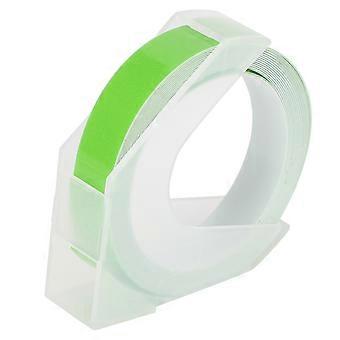
Embosser Manual Typewriter Handheld DIY Embossing Label Maker School Supplies Green

CA$42.95
免费送货

Embosser Manual Typewriter Handheld DIY Embossing Label Maker School Supplies Green

  • 品牌: Unbranded

Embosser Manual Typewriter Handheld DIY Embossing Label Maker School Supplies Green

  • 品牌: Unbranded
建议零售价: CA$54.00
价格: CA$42.95
您节省了: CA$11.05 (20%)
由……售出:
(优质卖家)
CA$42.95
免费送货

有货

14天退货政策

我们接受以下付款方式

描述

Embosser Manual Typewriter Handheld DIY Embossing Label Maker School Supplies Green

Feature: 1. The handheld typewriter can make embossed adhesive labels and can print letters, numbers and symbols. 2. This embosser manual typewriter is ergonomically designed, easy to use and modern in appearance. 3. The typewriter is easy to use, portable, no battery or power required, suitable for scrapbooks, photo albums, and DIY projects. 4. With adhesive and 9mm special adhesive tape. The adhesive tape comes with adhesive, which can be pasted on any glossy exterior after removing the adhesive. 5. No ink, permanent use, stamping principle, invert the mold on the tape, and auto‑forward 1‑button type, cut 1‑button type, convenient and quick disk changing. Specification: Item Type: Embosser Manual TypewriterMaterial: ABS Function: Suitable for scrapbooks, photo albums, DIY projects Size: Approx. 11.5 x 5.2 x 2.2cm / 4.5 x 2 x 0.9in(manual measurement, for reference)Tape Length: Approx. 2meters / 6.6ftTape Width: Approx. 9mm / 0.4inInstructions: 1. Insert the tape into the white pinion port, press the handle continuously, and roll the tape in (note: the handle is pressed with two ridges, half of it is a space, and the bottom is to print) 2. Bring the tape to about the red line and start typing, the printed word is in the middle 3. Turn the dial manually to find the word to be printed and press it firmly 4. After printing, manually turn the dial to the scissors, and press it to the end to cut the tape 5. Tear off the adhesive and stick it where you want to stick (the plane is firmer)Change Plate Steps: 1. Turn to the back of the labeling machine and push the middle black button 2. The middle snap button on the front can be pulled out 3. Pull out the middle snap 4. Take out the plate 5. Put in the plate, install the button 6. The change plate is completeLetter Plate Size: Approx. 5.5cm / 2.2in 5.5cm / 2.2in. Package List: 1 x Printing Label Machine1 x Letter Plate1 x Tape Note: 1. There are 2 ridges when the handle is pressed, half of which is a space, and the bottom is pressed to print.2. This model uses concave‑convex printing, that is, the principle of stamping. It will be clear when typing is pressed hard to the end. The cutting function is to cut off a small rectangle. The edge may not be ideal. You can trim it with scissors to be beautiful.3. Remove the remaining tape after disassembling the turntable and pull it out, which may cause damage to the tape.
  • Fruugo ID: 392824644-840206527
  • EAN: 7354012317131

产品安全信息

请参阅下面列出的特定于该产品的产品安全信息

以下信息由销售该产品的独立第三方零售商提供。

产品安全标签

CE Mark
安全警告: Warning: Please read the product instructions carefully before use to ensure correct use.
序列号: 7354012317131

配送 & 退货

在 2 天内发货

  • STANDARD: 免费 - 之间的交付 周四 25 十二月 2025–周四 01 一月 2026 - 免费

从 中国 送货。

我们会争取将您订购的产品按照您的规格完整地配送给您。不过,万一您收到不完整的订单,或收到的产品与您订购的不同,或者有其他原因让您对订单不满意,您可以要求全部或部分退货,您将收到相应产品的全额退款。 查看完整的退货政策

产品合规详细信息

请参阅下面概述的针对该产品的合规性信息。

以下信息由销售该产品的独立第三方零售商提供。

制造商:
以下信息概述了在Fruugo销售的相关产品的制造商联系信息。

  • Wuhan Jinxingkai Network Technology Co., Ltd.
  • Wuhan Jinxingkai Network Technology Co., Ltd.
  • No. 1-1, Door 57
  • Shihua Village
  • Qingshan District
  • Wuhan
  • CN
  • 430000
  • goldxinks@163.com
  • 0086 17786498762
  • https://shop01473o1711614.1688.com/page/creditdetail.htm?spm=a261y.7663282.shopNavigation.1.6310755czE9SFQ

欧盟负责人:
以下信息概述了欧盟负责人的联系信息。该负责人是位于欧盟的指定经济运营者,负责有关销售到欧盟的相关产品的合规义务。

  • None
  • Kequ Technology s.r.o.
  • Pražákova 1008/69
  • Štýřice
  • Jihomoravský kraj
  • Brno
  • CZ
  • 63900
  • christopher25106@outlook.com
  • 420608214795